My Homelab
I recently gave a presentation on my homelab and I realized that there is a ton of stuff in there that I didn't have time to talk about. I'm making this post as a deep dive into every aspect of my homelab, exactly what I'm hosting as well as how it all works together (or doesn't).
An Overview
This is my homelab:
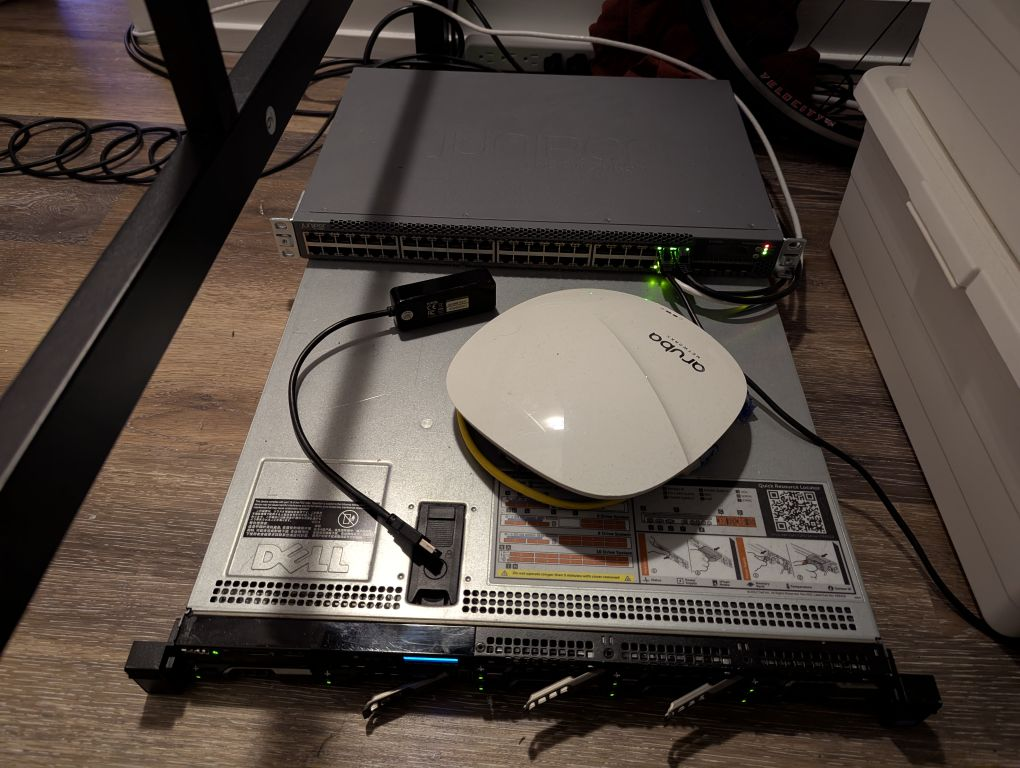 It is comprised of a dell R620 server and A Juniper EX3300 PoE switch. I got the server off of Facebook Marketplace for $200 and the switch was free. The only modification I have made to either machine was adding an Nvidia Tesla P4 video accelerator card to the server for hardware video decoding for Jellyfin.
I host several services both publicly and privately, here is a screenshot of what my PVE webui looks like:
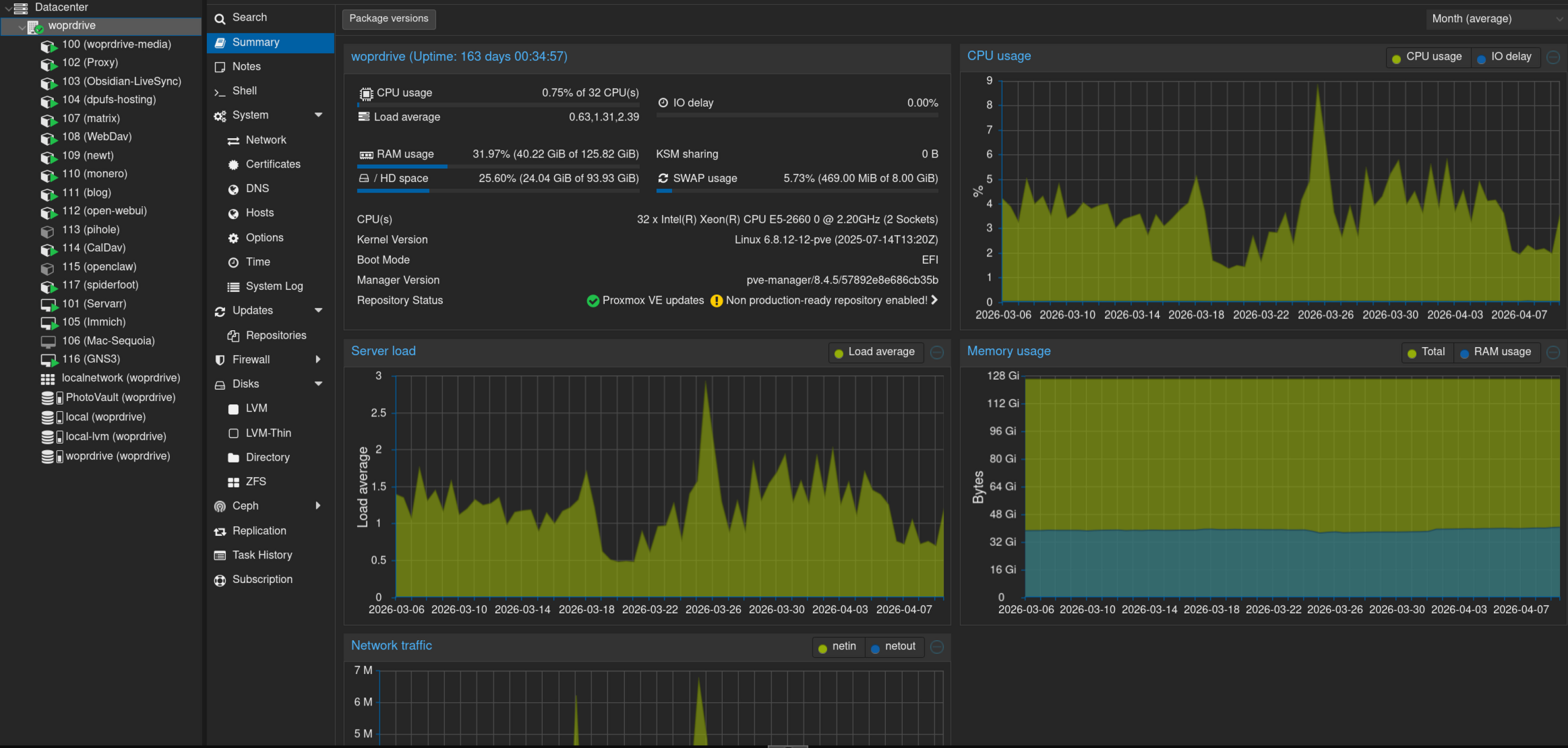 As you can see theres quite a lot of VMs/LXCs. I'm going to start at the top and work my way downward with one exception.
SMB Share
- Difficulty: 2/10
My smb share is hosting a ~12 TB ZFS drive that was created in Proxmox, theres not too much to say about this one, It just hosts this as a local shared resource for my other machines to access.
Configuration
/etc/smb/smb.conf
[global]
   server string = woprdrive-media
   workgroup = WORKGROUP
   security = user
   map to guest = Bad User
   name resolve order = bcast host
   hosts allow = 10.0.0.0/8
   hosts deny = 0.0.0.0/0
[Data]
   path = /data
   force user = katchowski
   force group = katchowski
   create mask = 0774
   force create mode = 0774
   directory mask = 0775
   force directory mode = 0775
   browseable = yes
   writable = yes
   read only = no
   guest ok = no
[PhotoVault]
   path = /PhotoVault
   force user = katchowski
   force group = katchowski
   create mask = 0774
   force create mode = 0774
   directory mask = 0775
   force directory mode = 0775
   browseable = yes
   writable = yes
   read only = no
   guest ok = no
LAN Exclusive Reverse Proxy
- Difficulty: 3/10
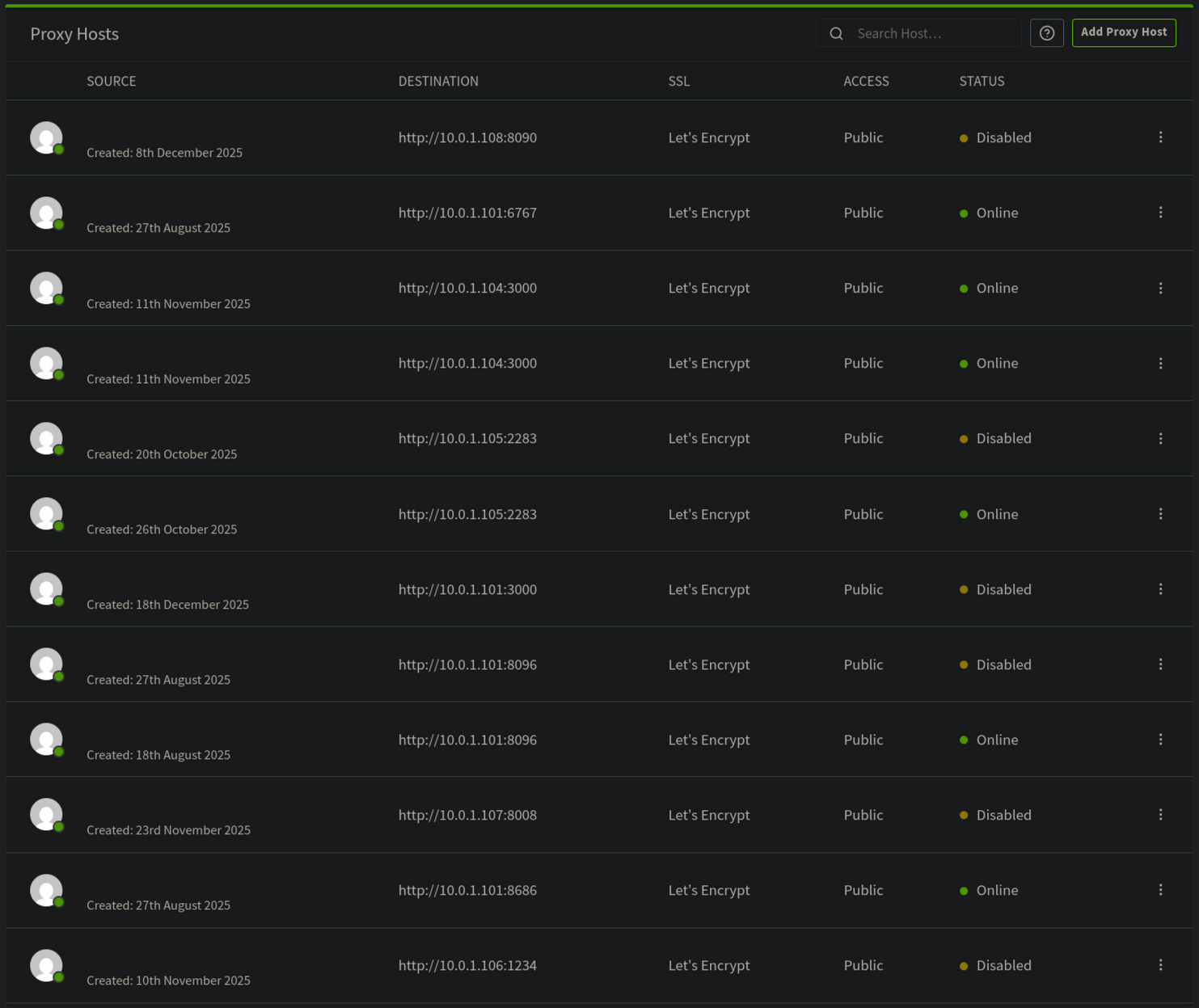
I host a reverse proxy using Nginx proxy manager for resources that are LAN accessible only, this includes all configuration dashboards for my services. Nginx proxy manager is a front-end for Nginx (ik crazy right) that allows easy management of resources, domains, and SSL certs. Once ti is set up and you have an administrator account you can add a new resource, I use LetsEncrypt for free SSL certs for my LAN resources so I don't need to remember which IP goes to which Machine.
Notes Sync
- Difficulty: 4/10
I use Obsidian to write my notes (I don't want to but that will likely become another post so I wont go into that here), and I want my notes to be available to me no matter which one of my devices I am using. I also don't want to key for obsidian sync so I self host my own solution using a plugin called Self Hosted Live Sync. This plugin is seriously impressive, It has been noticeably faster than Obsidian sync, Its able to sync changes to one document on one devices to another in less than a second while updating a server-side database that deal with conflicts very well. Its not difficult to set up and I would highly recommend this as a fun weeknight project.
Configuration
Docker Compose File
services:
  couchdb-obsidian-livesync:
    image: docker.io/oleduc/docker-obsidian-livesync-couchdb:master
    container_name: couchdb-obsidian-livesync
    restart: always
    environment:
      SERVER_URL: ${SERVER_URL}
      COUCHDB_USER: ${COUCHDB_USER}
      COUCHDB_PASSWORD: ${COUCHDB_PASSWORD}
      COUCHDB_DATABASE: ${COUCHDB_DATABASE}
    ports:
      - "${COUCHDB_PORT:-5984}:5984"
    volumes:
      - ${COUCHDB_DATA}:/opt/couchdb/data
Link Shortener
- Difficulty: 3/10
This is a great for anyone who owns a domain, The convenience you get from being able to create whatever link you want without having to deal with something like tinyurl or some other service collecting data from you and anyone you share a link with is great. I am hosting an open source project called kutt, kutt is has some really cool features baked in, it actually allows users (if you have them) to add their own domains it also doesn't harvest data about you, which is a huge plus. Other than that is is a very feature rich service.
Configuration
Docker Compose
services:
  server:
    build:
      context: .
    volumes:
       - db_data_sqlite:/var/lib/kutt
       - custom:/kutt/custom
    environment:
      DB_FILENAME: "/var/lib/kutt/data.sqlite"
    ports:
      - 3000:3000
volumes:
  db_data_sqlite:
  custom:
There is more configuration in kutts .env file but I'm not publishing that for obvious reasons
Photo Sync
- Difficulty: 2/10
Another must have to any homelabber is a platform agnostic image sync service, this helps so much in making it easier for you to have any phone you want without being locked into iCloud or Google Photos or some other proprietary sync service, I use Immich. Immich is great, its free and open source and it supports almost any platform. It has apps for Android and iOS as well as a webapp for PC usage. Immich also doesn't compromise on features, it has AI powered face and object recognition (all local ofc, so very small models that can run on CPU) as well as albums, memories, people, places, and sharing any photo/album you want.
Configuration
Docker Compose
# WARNING: To install Immich, follow our guide: https://docs.immich.app/install/docker-compose

name: immich

services:
  immich-server:
    container_name: immich_server
    image: ghcr.io/immich-app/immich-server:${IMMICH_VERSION:-release}
    # extends:
    #   file: hwaccel.transcoding.yml
    #   service: cpu # set to one of [nvenc, quicksync, rkmpp, vaapi, vaapi-wsl] for accelerated transcoding
    volumes:
      # Do not edit the next line. If you want to change the media storage location on your system, edit the value of UPLOAD_LOCATION in the .env file
      - ${UPLOAD_LOCATION}:/data
      - /etc/localtime:/etc/localtime:ro
    env_file:
      - .env
    ports:
      - '2283:2283'
      - '443:443'
    depends_on:
      - redis
      - database
    restart: always
    healthcheck:
      disable: false

  immich-machine-learning:
    container_name: immich_machine_learning
    # For hardware acceleration, add one of -[armnn, cuda, rocm, openvino, rknn] to the image tag.
    # Example tag: ${IMMICH_VERSION:-release}-cuda
    image: ghcr.io/immich-app/immich-machine-learning:${IMMICH_VERSION:-release}
    # extends: # uncomment this section for hardware acceleration - see https://docs.immich.app/features/ml-hardware-acceleration
    #   file: hwaccel.ml.yml
    #   service: cpu # set to one of [armnn, cuda, rocm, openvino, openvino-wsl, rknn] for accelerated inference - use the `-wsl` version for WSL2 where applicable
    volumes:
      - model-cache:/cache
    env_file:
      - .env
    restart: always
    healthcheck:
      disable: false

  redis:
    container_name: immich_redis
    image: docker.io/valkey/valkey:8-bookworm@sha256:fea8b3e67b15729d4bb70589eb03367bab9ad1ee89c876f54327fc7c6e618571
    healthcheck:
      test: redis-cli ping || exit 1
    restart: always

  database:
    container_name: immich_postgres
    image: ghcr.io/immich-app/postgres:14-vectorchord0.4.3-pgvectors0.2.0@sha256:bcf63357191b76a916ae5eb93464d65c07511da41e3bf7a8416db519b40b1c23
    environment:
      POSTGRES_PASSWORD: ${DB_PASSWORD}
      POSTGRES_USER: ${DB_USERNAME}
      POSTGRES_DB: ${DB_DATABASE_NAME}
      POSTGRES_INITDB_ARGS: '--data-checksums'
      # Uncomment the DB_STORAGE_TYPE: 'HDD' var if your database isn't stored on SSDs
      # DB_STORAGE_TYPE: 'HDD'
    volumes:
      # Do not edit the next line. If you want to change the database storage location on your system, edit the value of DB_DATA_LOCATION in the .env file
      - ${DB_DATA_LOCATION}:/var/lib/postgresql/data
    shm_size: 128mb
    restart: always

volumes:
  model-cache:
MacOS Ventura VM
- Difficulty: 8/10
I know it says Sequoia, that was the original goal, but it didn't work so I went with Ventura instead. Right now, this exists for no other reason than to amuse me, It used to serve a purpose (see: 001) but I no longer need it and I keep it around because its funny to have a fully functioning Mac with iMessage, icloud backup and all of the other proprietary Apple services running. For reference, it is relatively easy to get MacOS running oh hardware but getting Apple services running on non-genuine Apple hardware is difficult and sketchy. I don't have any configuration or guides for you on this, I cant even remember how I managed to get it working, but it definitely wasn't worth it and I don't recommend this to anyone.
[Matrix]
- Difficulty: 5/10 (Harder if you proxying through a VPS)
Matrix is cool as fuck. It is an open source, self hosted (this parts actually optional), decentralized, and encrypted communication network. Imagine Discord but private and self hostable. Matrix itself is not the service I am hosting, Matrix itself is a specification detailing how clients and servers should communicate, and how servers and other servers communicate. The standard being so open means that there are many apps you can choose from on the client side and on the server side, I personally am using tuwunel as my server and element as my client. When setting up I followed the tuwunel official docs the server is well documented and pretty easy to running. Make sure you remember to port forward 8008 (tuwunel itself) and 8448 (for Federation).
SFTPGo
- Difficulty: 3/10
I have a SFTP server set up to run WebDav for my phone to automatically back up to every night. I chose SFTPGo because it is open source, feature rich, and extremely preformant. Theres not much more to say about this one, it just works out of the box, all you have to do is enable WebDav and set it up on your device.
Newt
This is a simple one that will come up later, it runs a wireguard tunnel to my VPS so I can proxy all my public resources.
Monero Node
- Difficulty: 6/10
I self host a Monero node, If you don't already know Monero is a cryptocurrency with a focus on privacy, out of the box it is extremely difficult to trace. My node runs over i2p instead of tor because i2p is more optimized for hidden services. I recommend following the official documentation for Monero, I wouldn't trust anything else with something this sensitive: https://docs.getmonero.org/running-node/monerod-systemd/
Blog
- Difficulty: 4/10
I set this up because a friend of mine kept telling me to, I think its because I yap to much and he wanted me to stop showing up at his office unannounced to talk about homelabbing. The setup here is very simple, I am using a markdown to static site generator called Zola, I picked it because it looked easy to use and it comes with a bunch of great looking community made themes (I'm using terminus). I have Zola set up to dump the generated files into a ./public directory that Nginx is hosting. The whole setup uses ~80Mb of ram on average (sitting on the page and refreshing it as fast as I can doesn't seem to increase that number at all).
Configuration
Zola Config
# The URL the site will be built for
base_url = "https://katchow.ski"

# Whether to automatically compile all Sass files in the sass directory
compile_sass = true

# Whether to build a search index to be used later on by a JavaScript library
build_search_index = true

theme = "terminus"
title = "katchow.ski"
author = "katchowski"
generate_feeds = true
feed_filenames = ["rss.xml"]

[markdown]
# Whether to do syntax highlighting
# Theme can be customised by setting the `highlight_theme` variable to a theme supported by Zola
highlight_code = true

[extra]
# Put all your custom variables here
Open-webui
- Difficulty: 2/10
Open-webui is mainly a fronend for local LLMs, it also supports some API keys. I use it with models over API because I prefer to pay only for what I use rather than a flat monthly fee.
The rest
The other Servers on the list (pihole, CalDav, openclaw, and spiderfoot) are not yet finished and ready for presentation. They are still works in progress.
The Final Boss of Media Servers
My media server (called Servarr) does damn near everything short of making you breakfast in bed, it is easily the biggest server I host and for that reason I will be splitting this section up into 3 parts:
- YouTube
- Music
- Video
YouTube
- Difficulty: 7/10
I don't like Google, I find that their invasive data harvesting practices make their products unusable. Because of my disdain for them I spent 2 and a half years de-googling my life one step at a time. The last Google product I stopped using was YouTube, I was more scared to try to get rid of YouTube than I had been with any other Google product. I am someone who uses YouTube every single day of my life, I don't think I could live without it at this point. Lucky for me I found a project called Invidious, a self hosted and privacy friendly YouTube frontend. Invidious took some work to get running properly, its not one service its split up into 3 and I had some issues getting them to properly communicate with each other but eventually I got it all working and I ditched YouTube forever. I currently have a browser extension set up to redirect any YouTube links to the same video streamed through my Invidious instance (this actually works for embedded videos as well).
version: "3"
services:

  invidious:
    image: quay.io/invidious/invidious:latest
    # image: quay.io/invidious/invidious:latest-arm64 # ARM64/AArch64 devices
    restart: unless-stopped
    # Remove "127.0.0.1:" if used from an external IP
    ports:
      - "3000:3000"
    environment:
      # Please read the following file for a comprehensive list of all available
      # configuration options and their associated syntax:
      # https://github.com/iv-org/invidious/blob/master/config/config.example.yml
      INVIDIOUS_CONFIG: |
        db:
          dbname: invidious
          user: redacted
          password: redacted
          host: invidious-db
          port: 5432
        registration_enabled: false
        captcha_enabled: false
        admins: ["katchowski"]

        check_tables: true
        invidious_companion:
        # URL used for the internal communication between invidious and invidious companion
        # There is no need to change that except if Invidious companion does not run on the same docker compose file.
          - private_url: "http://companion:8282/companion"
            public_url: "https://invidious.redacted.com/"
        # IT is NOT recommended to use the same key as HMAC KEY. Generate a new key!
        # Use the key generated in the 2nd step
        invidious_companion_key: "redacted"
        external_port: 443
        domain: "invidious.redacted.com"
        https_only: true
        use_pubsub_feeds: true
        use_innertube_for_captions: true
        # statistics_enabled: false
        # Use the key generated in the 2nd step
        hmac_key: "redacted"
    healthcheck:
      test: wget -nv --tries=1 --spider http://127.0.0.1:3000/api/v1/stats || exit 1
      interval: 30s
      timeout: 5s
      retries: 2
    logging:
      options:
        max-size: "1G"
        max-file: "4"
    depends_on:
      - invidious-db

  companion:
    image: quay.io/invidious/invidious-companion:latest
    environment:
    # Use the key generated in the 2nd step
       - SERVER_SECRET_KEY=redacted
    restart: unless-stopped
    # Uncomment only if you have configured "public_url" for Invidious companion
    # Or if you want to use Invidious companion as an API in your program.
    # Remove "127.0.0.1:" if used from an external IP
    ports:
      - "8282:8282"
    logging:
      options:
        max-size: "1G"
        max-file: "4"
    cap_drop:
      - ALL
    read_only: true
    # cache for youtube library
    volumes:
      - companioncache:/var/tmp/youtubei.js:rw
    security_opt:
      - no-new-privileges:true

  invidious-db:
    image: docker.io/library/postgres:14
    restart: unless-stopped
    volumes:
      - postgresdata:/var/lib/postgresql/data
      - ./config/sql:/config/sql
      - ./docker/init-invidious-db.sh:/docker-entrypoint-initdb.d/init-invidious-db.sh
    environment:
      POSTGRES_DB: invidious
      POSTGRES_USER: redacted
      POSTGRES_PASSWORD: redacted
    healthcheck:
      test: ["CMD-SHELL", "pg_isready -U $$POSTGRES_USER -d $$POSTGRES_DB"]

volumes:
  postgresdata:
  companioncache:
Music
If you read this blog, you probably know about this one already. I'm not going to go into a lot of detail on this one because I already talked about it here. I am using Lidarr, Soularr, SLSKD, and Navidrome to automatically download and stream music. An update for all who read the previous post: It is semi-working! It works more than well enough for me to have mostly switched off of spotify now, the only hiccup is Soularr often downloads the wrong song for singles form from less mainstream artists.
Onto the big one.
Video (The Servarr)
This box hosts a lot of stuff, heres a quick overview:
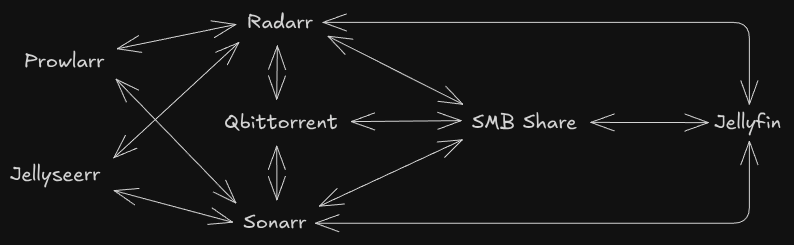
Yeah, that's right, I made diagrams, In all seriousness this shows what what services I'm running and how they all communicate. lets start off simple with Jellyseerr.
Jellyseerr
Jellyseerr is a service for media discovery and library expansion, it allows me to search for any movie or TV show and add that to my Radarr/Sonarr library. It doesn't require much configuration beyond adding API keys and URLs for Radarr and Sonarr.
Docker Compose
  jellyseerr:
    container_name: jellyseerr
    image: fallenbagel/jellyseerr:latest
    environment:
      - PUID=1000
      - PGID=1000
      - TZ=America/Los_Angeles
    volumes:
      - ./jellyseerr:/app/config
    ports:
      - 5055:5055
    restart: unless-stopped
Prowlarr
Prowlarr is a service to manage indexers across many *arr apps. You set up your indexers once and it can sync to any other *arr apps your hosting.
Docker Compose
  prowlarr:
    image: lscr.io/linuxserver/prowlarr:latest
    container_name: prowlarr
    environment:
      - PUID=${PUID}
      - PGID=${PGID}
      - TZ=${TZ}
    volumes:
      - /etc/localtime:/etc/localtime:ro
      - ./prowlarr:/config
    restart: unless-stopped
    depends_on:
      vpn:
        condition: service_healthy
        restart: true
    network_mode: service:vpn
Radarr & Sonarr
Radarr and Sonarr arr likely the most important part of this setup, they do library management for movies and TV shows respectively. They communicate with almost ever other service on the network to do what they need to do. Heres what radarr/soanrr actually do when I add something through jellyseerr. First *arr receives the import from jellyseerr, then they grab the list of indexers I use from prowlarr. After they have that list they start searching my highest propriety indexer for what ever piece of content I wanted, I continues down the whole list until it finds it. Once it finds it *arr will send the information over to qBittorrent to download. I all of my configuration for *arr apps is from Trash Guides, I highly recommend their site for configuring these services.
Jellyfin
This is the flashy part, it is both a website and an api endpoint, users can watch content directly on the website or they can use their own client like Fladder or Moonfin. Jellyfin, like Plex, is a way to stream content from a self hosted server, it can stream movies, music, TV shows, and even live TV.

qBittorrent
This is my BitTorrent client of choice, I use this one because all the other ones kinda suck. qBittorrent is very feature complete and gives me everything I need to be able to securely and privately seed and leech terabytes of content every month
VPN
I have an instance of my VPN running in a docker image, it creates a network interface on the machine that is usable by other programs. I route all my traffic from Soulseek and qBittorrent through this VPN for privacy reasons.